コラボ概要欄メーカー
A downloadable tool for Windows
✨【まずは無料体験版でお試し!】
コラボ配信の概要欄づくり、まだ毎回手作業でコピペしていませんか? ✨
「チャンネルを開いて、URLをコピーして、名前を打ち直して……」
そんな面倒な作業はもう終わり!
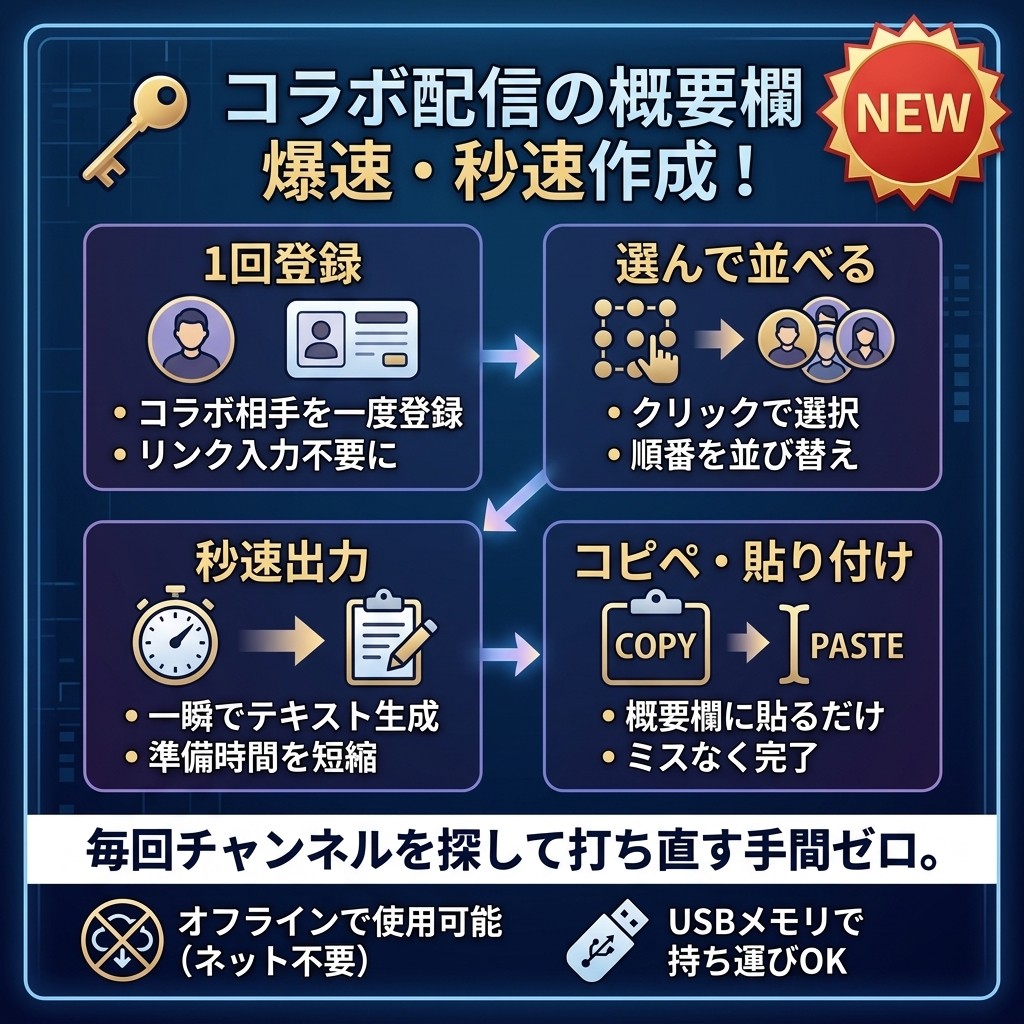
『コラボ概要欄メーカー CD-01』なら、相手を1回登録しておくだけで
次からは【選んで並べるだけ】で一瞬で概要欄が完成します🚀
🎁「自分の環境で動くか試したい」「使い心地を確かめたい」という方へ
まずはページ内の【無料体験版】をダウンロードしてお試しいただけます!
--------------------------------------------------
🎯 こんなお悩みありませんか?
--------------------------------------------------
😭 コラボのたびにURLやX(Twitter)のリンクを探すのが大変…
😭 概要欄の順番を入れ替えるのが面倒くさい…
😭 5,000文字制限を超えてエラーにならないか心配…
😭 ネット上に個人情報や配信者データを置くのは不安…
👉 これ全部、『コラボ概要欄メーカー』が解決します!
--------------------------------------------------
🌟 このソフトのここがすごい!おすすめポイント 🌟
--------------------------------------------------
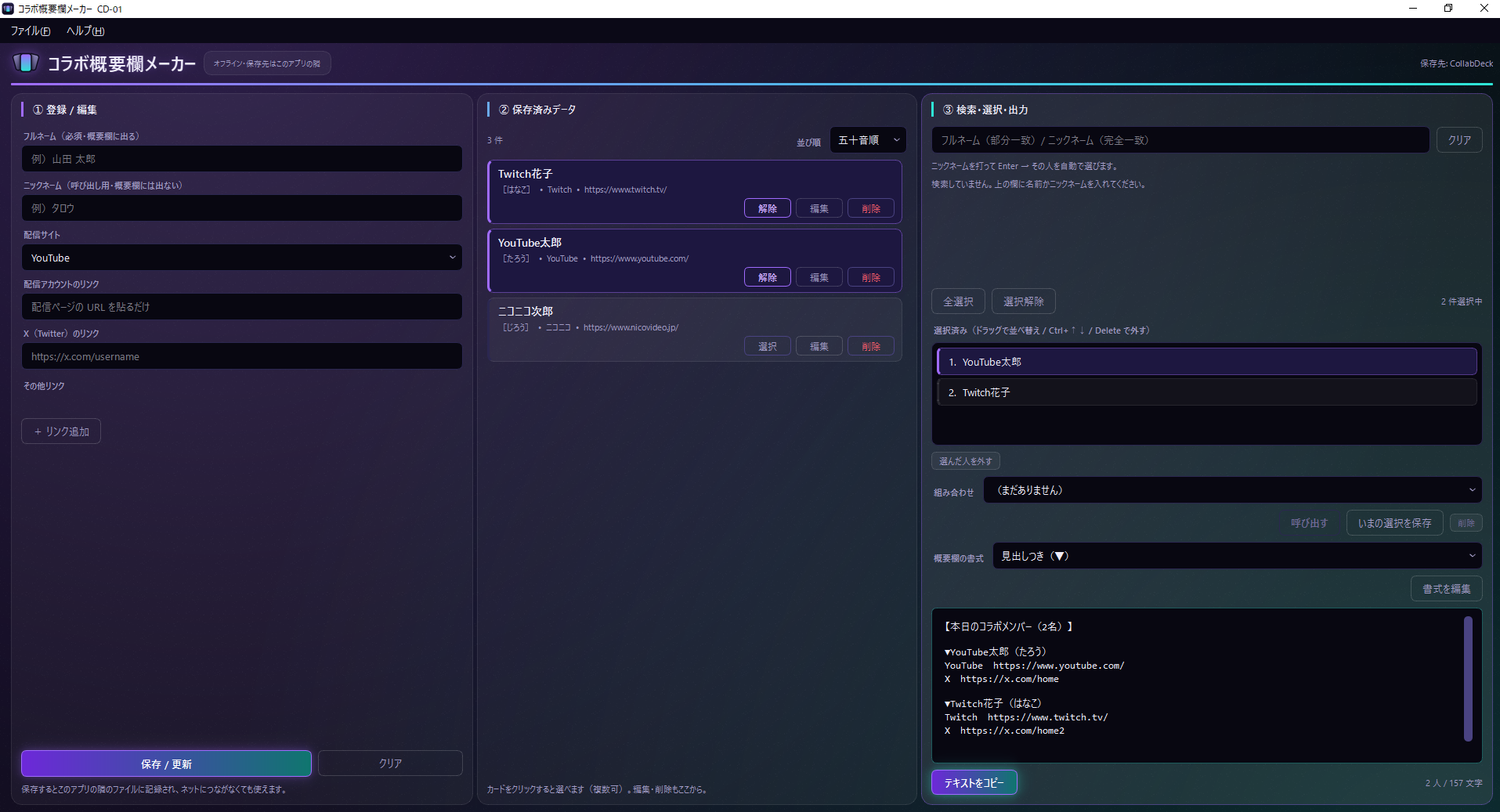
1️⃣ 【選んで並べるだけ】秒速で概要欄が完成!
・ニックネームで検索してEnterを押すだけで自動選択!
・ドラッグ&ドロップ(または Ctrl+↑/↓)で並び替えも一瞬!
・「テキストをコピー」を押して概要欄に貼るだけ(Ctrl+Shift+C対応)
2️⃣ 【1度登録すればOK】URLから配信サイトを自動判別!
・YouTube、Twitch、ツイキャス、ニコ生、TikTokなど自動判別!
・X(Twitter)やnote、BOOTHなどのリンクもすっきり整理できます!
3️⃣ 【オフライン完全対応】ネット不要でデータ安心!
・データはお手元のパソコン内(ソフトと同じフォルダ)だけに保存!
・外部サーバーへ送信されないので、大切なデータが漏洩しません。
・USBメモリに入れて持ち運べば、どのPCでもそのまま使えますポータブル仕様!
4️⃣ 【安心の自動バックアップ&履歴機能】
・万が一のときも安心!自動で控え(バックアップ)を作成。
・過去に作った概要欄も直近50件まで履歴からいつでも呼び出せます!
5️⃣ 【初心者でもかんたん・安心】
・インストール不要!ダウンロードしてすぐ使えます。
・万が一動かない時も「検査.bat」を押すだけで原因を日本語で教えてくれます!
--------------------------------------------------
🆓 無料体験版について
--------------------------------------------------
まずは使い勝手を試してみたい方向けに「無料体験版」をご用意しています。
製品版とまったく同じ基本操作をお試しいただけますので、ぜひダウンロードしてみてください!
(※動作確認用の体験版となります)
--------------------------------------------------
🛠️ 主な機能・仕様
--------------------------------------------------
■ 対応OS:Windows 10 / 11(64bit)
■ 形式:インストール不要(zipを解凍してすぐ起動)
■ 主な機能:
・コラボ相手の一元管理(登録・編集・五十音順並び替え)
・よく使うメンバーの「組み合わせ保存」機能
・書式カスタマイズ(番号つき、▼見出しつき、コンパクト1行など)
・YouTube文字数オーバー(5,000文字)警告機能
・自動バックアップ&復元機能/CSV入出力対応
--------------------------------------------------
🎁 配信準備の時間を節約して、もっと配信を楽しもう!
--------------------------------------------------
毎回の配信準備のストレスをゼロにして、もっとコラボ配信を楽しみませんか?
まずは無料体験版からお気軽にお試しください!
#VTuber #配信者ツール #YouTube #Twitch #コラボ配信 #概要欄作成 #時短ツール #便利ソフト #無料体験版
------------
✨【Try the Free Trial First!】Still manually copying & pasting channel links for every collab stream? ✨
"Open channel -> Copy URL -> Re-type name -> Reorder list..."
Say goodbye to that tedious process!
With 『Collab Description Maker CD-01』, simply register your streamer friends once, then just【Select & Arrange】to generate your description in seconds! 🚀
🎁 Want to test if it works on your PC?
Download the【Free Trial Version】on this page and give it a try right away!
--------------------------------------------------
🎯 Facing These Common Hassles?
--------------------------------------------------
😭 Tired of hunting down links and social profiles every time you collab?
😭 Reordering team member lists in text editors is annoying...
😭 Worried about exceeding YouTube's 5,000-character limit?
😭 Uncomfortable uploading private data to cloud servers?
👉 『Collab Description Maker』 solves ALL of these!
--------------------------------------------------
🌟 Key Features & Highlights 🌟
--------------------------------------------------
1️⃣【Select & Arrange】Done in Seconds!
・Search by nickname and hit Enter to auto-select!
・Drag & drop (or Ctrl+Up/Down) to easily reorder your list.
・Click "Copy Text" (or press Ctrl+Shift+C) and paste directly into your stream description!
2️⃣【Register Once】Auto-Detects Platforms from URLs!
・Automatically recognizes YouTube, Twitch, TwitCasting, NicoNico, TikTok, Kick, and more!
・Organizes extra links like X (Twitter), note, and BOOTH cleanly.
3️⃣【100% Offline & Portable】Your Data Stays Safe!
・Runs entirely on your PC—no internet connection required.
・Your saved contacts stay on your device and are never sent to external servers.
・Put it on a USB drive and run it anywhere without installation!
4️⃣【Auto-Backup & History Tracking】
・Peace of mind with automatic local backups.
・Restores up to your last 50 generated descriptions from history!
5️⃣【Beginner-Friendly & Easy Setup】
・No installation required—unzip and launch immediately!
・Built-in self-test tool ("検査.bat") diagnoses issues in plain Japanese/English if needed.
--------------------------------------------------
🆓 About the Free Trial Version
--------------------------------------------------
We provide a Free Trial Version so you can experience the workflow before purchasing.
It includes core features to test compatibility and ease of use on your system!
--------------------------------------------------
🛠️ Technical Specifications
--------------------------------------------------
■ Compatible OS: Windows 10 / 11 (64-bit)
■ Format: Portable / No Installation Required (Unzip & Run)
■ Features:
・Contact Management (Add, Edit, Sort alphabetically / by registration date)
・Preset Saved Groups (Load frequent collab teams with 1 click)
・Custom Format Editor (Numbered, Bulleted, Compact 1-line, English-bilingual templates)
・YouTube 5,000-character limit warnings
・Auto-backup & CSV import/export support
--------------------------------------------------
🎁 Save Preparation Time & Focus on Streaming!
--------------------------------------------------
Eliminate stream prep stress today.
Try the Free Trial Version now and speed up your collab workflow!
#VTuber #StreamerTools #YouTube #Twitch #Collab #StreamPrep #FreeTrial #Productivity
Purchase
In order to download this tool you must purchase it at or above the minimum price of $10 USD. You will get access to the following files:
Download demo
Leave a comment
Log in with itch.io to leave a comment.